





Published: June 16, 2026 | Last Updated: June 16, 2026
What Are n8n and Make?
n8n is an open-source, node-based workflow automation platform available either self-hosted or as a managed cloud service. Its billing unit — called an “execution” — covers one complete run of an entire workflow regardless of how many steps or how much data it processes. A five-step workflow that runs once consumes a single execution, not five. This is the detail that most directly separates n8n’s cost model from Make’s.
Make (formerly Integromat) is a cloud-based visual automation platform built around a drag-and-drop scenario builder where workflows are laid out left-to-right as connected modules. It is aimed at teams that want complex branching logic and a large pre-built app catalog without writing code. Make shifted its billing unit from “operations” to “credits” in August 2025; for standard module actions the two are roughly equivalent, but AI-related actions and the Code app consume credits at a higher rate.
Quick Comparison
n8n vs Make at a glance
| Feature | n8n | Make |
|---|---|---|
| Deployment | Self-hosted or managed cloud | Cloud only |
| Open Source | Yes (fair-code / Sustainable Use License) | No |
| Free Tier | Unlimited self-hosted Community Edition | 1,000 credits/month, capped active scenarios |
| Billing Unit | Per workflow execution | Per credit (≈ 1 credit per standard module action) |
| Entry Cloud Price | From €20/month (Starter, annual billing) | Roughly $9–12/month (Core, annual billing) |
| Native Code Support | JavaScript and Python in-workflow | Limited; a separate paid Code app |
| Built-in Integrations | 400+ official nodes, ~2,000 community nodes | 1,800–3,000 native modules |
| Git-Based Version Control | Yes (Business tier and above) | No direct equivalent |
| Best Fit | Developers and technical teams | Non-technical users, SMBs, agencies |
| Data Residency | Full control if self-hosted; EU (Frankfurt) if cloud-hosted | Determined by Make’s hosting infrastructure |
Pricing — What Will It Actually Cost You
n8n
n8n’s cloud pricing runs four tiers:
- Starter — from €20/month (annual billing), 2,500 executions
- Pro — from €50/month, 10,000 executions
- Business — from €667/month, 40,000 executions; adds SSO and Git-based version control
- Enterprise — custom-quoted
Self-hosting the Community Edition is free, with unlimited executions limited only by your own server capacity. Independent guides estimate server costs at roughly $5–40/month depending on workload.
Make
Make’s pricing runs Free through Core, Pro, Teams, and a custom Enterprise tier, billed by credit consumption with an annual-billing discount:
- Free — 1,000 credits/month
- Core — roughly $9–12/month for ~10,000 credits
- Pro — roughly $16–21/month for ~10,000 credits
- Teams — roughly $29–38/month for ~10,000 credits
The spread in figures above reflects regional pricing and monthly-versus-annual billing differences across the trackers consulted. Credit add-ons are available at roughly a 25% premium over base-plan rates.
The Cost Model — One Worked Example
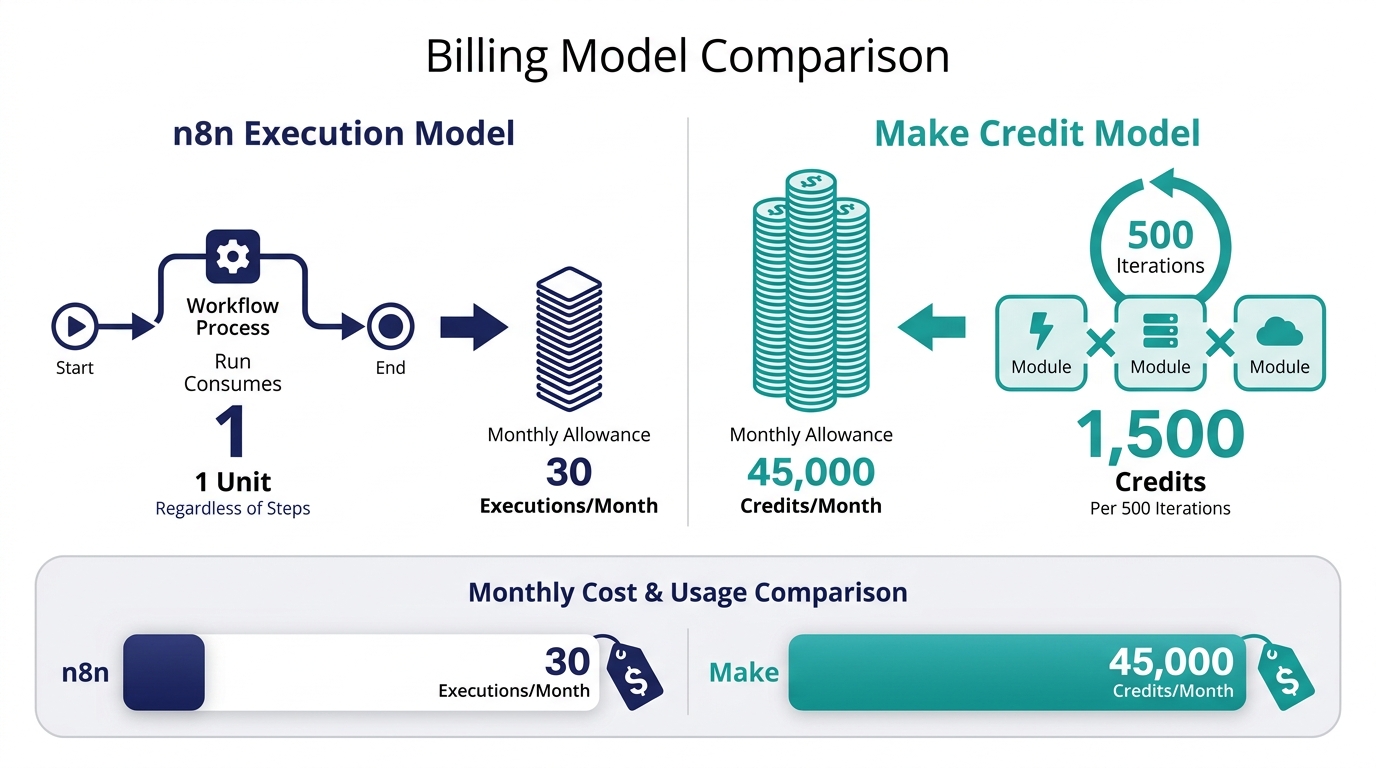
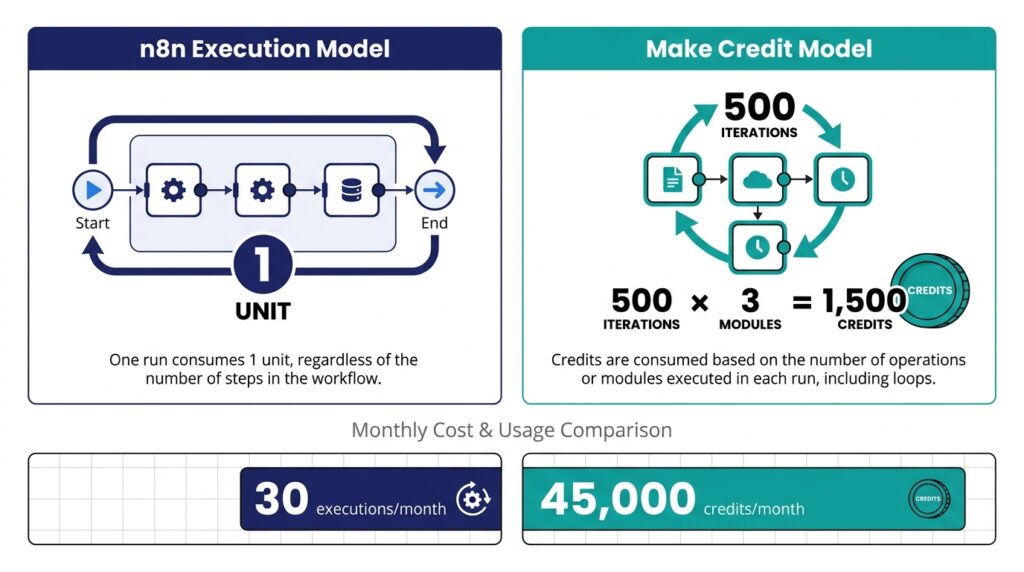
The clearest way to understand the difference is a concrete scenario: a workflow that runs once daily, loops over 500 records, and calls 3 modules per record.
On n8n: one execution covers the entire workflow run regardless of internal step or record count. This scenario consumes 1 execution per day — roughly 30 executions per month — well within the Starter tier’s 2,500-execution allotment.
On Make: credits are consumed per module action per loop iteration. This scenario consumes 500 × 3 = 1,500 credits per run, or roughly 45,000 credits per month — more than four times the 10,000-credit base allotment on Core, Pro, or Teams. That requires either a plan upgrade, purchased credit add-ons, or redesigning the scenario to batch records rather than loop individually.
This is why workflow shape — not plan tier — is the better predictor of real cost. A loop-heavy workflow that looks identical in complexity on both platforms can land in a completely different pricing tier depending on which billing model applies.
Ease of Use
n8n’s node-based editor assumes familiarity with APIs, JSON, and at least basic scripting. Configuring authentication and branching logic is straightforward for a developer but can be a genuine barrier for a non-technical user building a first workflow unassisted.
Make’s scenario builder is consistently identified across independent comparison guides as the more approachable interface for non-developers, with a visual, spreadsheet-like data-mapping system that avoids writing expressions. This generally lets non-developers build functional scenarios faster than they could in a code-oriented tool.
One nuance worth noting: Make’s builder is approachable, but its pricing model is not. Predicting credit consumption for a loop-heavy or AI-module-heavy scenario is a different kind of complexity from n8n’s, but a real one.
Integrations & Connectivity
n8n ships with 400+ official built-in nodes plus a community-node ecosystem of nearly 2,000 published packages with over 8 million downloads. Where no pre-built node exists, its HTTP Request node connects to any REST or GraphQL API — making the effective integration count effectively unbounded for anyone willing to read API documentation.
Make’s app catalog is larger out of the box. Independent trackers place it anywhere from roughly 1,800 to 3,000+ native modules depending on when and how the count was taken, covering most mainstream SaaS categories without custom code. For teams that want to avoid touching an API directly, this remains Make’s clearest structural advantage.
Advanced Features
Error handling: n8n supports fallback branches and dedicated error-workflow triggers configured directly in the workflow graph. Make handles errors at the module level with per-module retry and ignore options — less granular but sufficient for most linear scenarios.
Data transformation: Make’s formula editor is spreadsheet-like and approachable for non-developers. n8n uses JavaScript expressions with an optional Python code-node path — more powerful for complex logic, but assumes coding familiarity.
Version control: n8n offers Git-based version control on its Business tier and above. Make has no direct equivalent, though it supports shared scenario templates on its Teams tier.
Scheduling and triggers: Both platforms support cron-style scheduling and webhooks. n8n additionally supports message-queue triggers and self-hosted queue-mode scaling for high-throughput, event-driven workloads.
AI and agent features: n8n has expanded its native AI node library to include current large language models and several vector-store integrations. Make has introduced AI Agent modules and supports both an MCP server — exposing scenarios as callable tools — and an MCP client for calling external AI tools from within a scenario. This category moves quickly; verify each vendor’s current changelog before relying on any specific AI-feature claim.
Security & Data Privacy
n8n’s self-hosting option means workflow data can stay entirely within infrastructure the organization controls, which matters for compliance-heavy industries such as healthcare and finance. For n8n’s managed cloud plans, data is stored in Frankfurt, Germany, within the EU.
Make operates as a cloud-only platform, so all workflow data passes through Make’s infrastructure regardless of plan. Make maintains standard SaaS security certifications and GDPR-compliance documentation. Organizations with strict data-residency or on-premises requirements should confirm Make’s current hosting-region documentation directly.
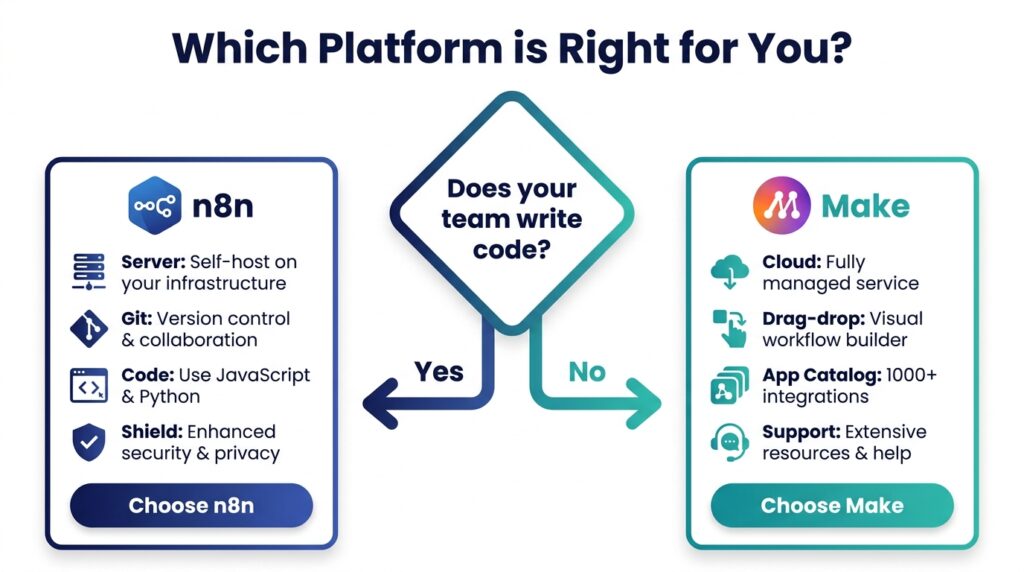
When to Choose n8n
- Your team includes developers comfortable with APIs and JavaScript or Python
- Data residency or compliance requirements mean workflow data needs to stay on infrastructure you control
- You need to integrate with proprietary or niche internal APIs that lack a pre-built connector
- Your automation volume is high enough that an execution-based pricing model is meaningfully cheaper than a per-action model
- You want Git-based version control over your automation logic
- You need event-driven triggers from message queues or databases, not just scheduled or webhook triggers
When to Choose Make
- Your team is largely non-technical and needs a visual, low-code builder
- You rely on a broad set of mainstream SaaS tools and want pre-built modules rather than API work
- You need automations running quickly without managing any infrastructure
- Your real credit consumption — including loops and AI modules — fits comfortably within a tier’s allotment
- You want a fully managed product with a larger out-of-the-box app catalog
- You are automating marketing, sales, or operations workflows at SMB scale rather than engineering-scale throughput
Conclusion
n8n suits technical teams that want control over infrastructure, data residency, and predictable execution-based costs at scale. Make suits teams that want a managed, visual builder with a larger pre-built app catalog and are comfortable budgeting around credit consumption rather than workflow count. Some organizations run both: Make for department-level, business-user-built workflows, and n8n for engineering-owned, high-volume, or compliance-sensitive pipelines.
Before committing to either platform on an annual plan, build one representative workflow on each and measure a week of real usage against the relevant pricing tier. Workflow shape affects price more than the headline rate does, and the only way to know which model suits your specific automations is to test them.
Sources
Official product documentation, pricing pages, integration references, and independent industry analyses used throughout this comparison.
Make.com Pricing Plans Explained: Credits, Tiers, and What You Actually Pay
Make.com Pricing 2026: Real Cost for SMB & How Operations Actually Work
Frequently Asked Questions
Common questions about n8n vs Make, pricing, hosting, integrations, and workflow automation.